

MemberPress simplifies registration and subscription payments by offering several payment options. It collects offline payments and integrates with Stripe, PayPal, Square, and Authorize.net for online payments.
This document explains how MemberPress payment gateways work and how MemberPress processes payments.
Gateways de pagamento MemberPress
When you enable a payment gateway in MemberPress settings, it adds a payment option to your registration pages.
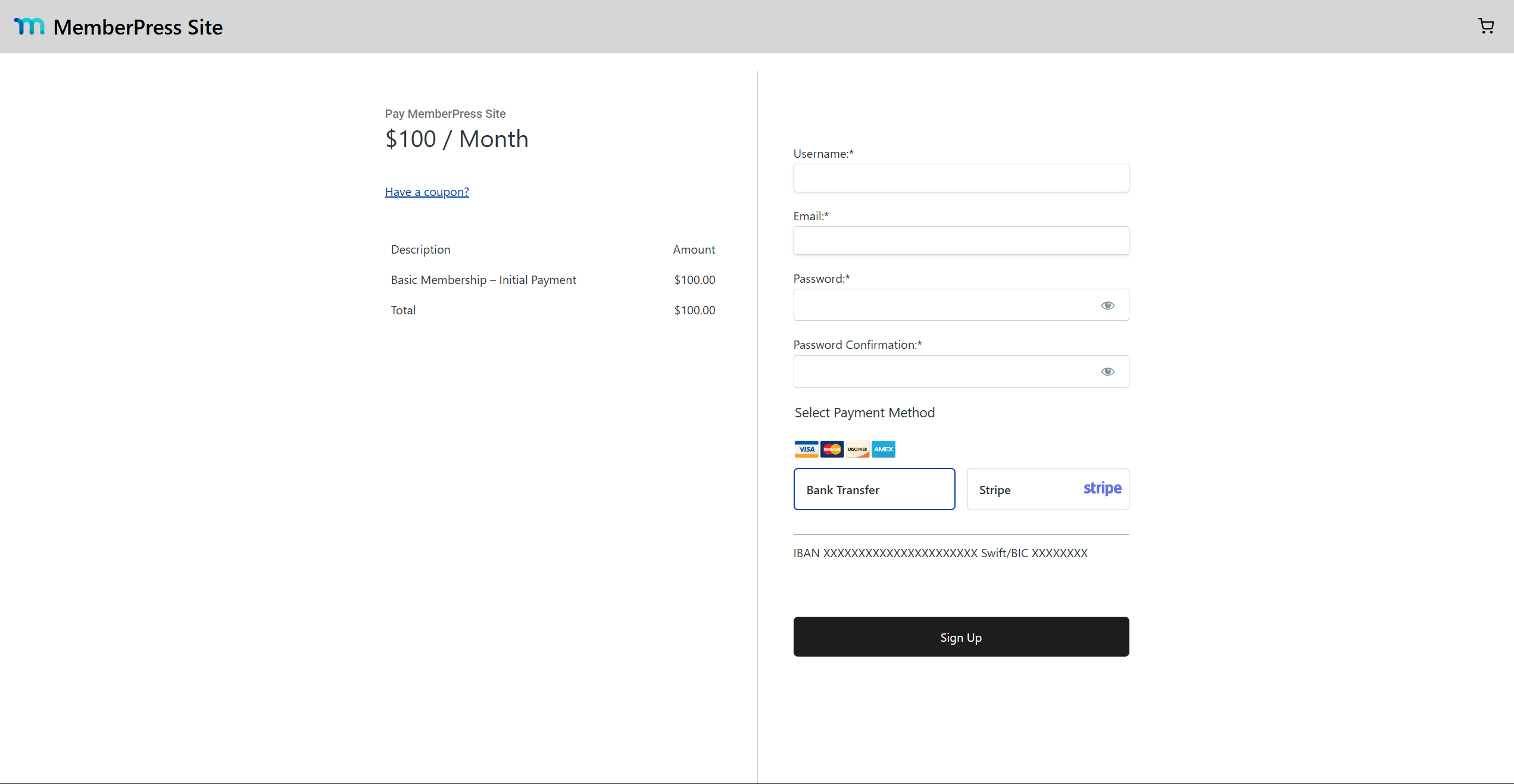
You can offer one or several payment methods, supporting both offline and online payments.
Se você ativar o MemberPress shopping cart, the cart checkout uses the same gateways. Each gateway has an Enable for cart option, disabled by default. The cart checkout supports Stripe and offline payments only. PayPal, Square, and Authorize.net work on registration pages only.
Pagamentos on-line vs. off-line
Offline payments are not collected on your website. Members pay by bank transfer or another method outside the site. When a member chooses an offline payment method, MemberPress creates a transaction and marks it as pending. You update its status manually once the payment arrives in your bank account.
Online payments are processed instantly by payment processors like Stripe, PayPal, or Square. Payment processors act as intermediaries that let merchants charge credit cards. During registration, MemberPress sends the user to a secure payment form provided by the processor. Once the payment completes, MemberPress creates and updates the transaction automatically. It activates or deactivates the subscription based on the payment status.
Payment forms appear either on a separate page or embedded in the registration page. Either way, the payment processor hosts them. Users submit their card details to the processor, never to your website.
Configuração de métodos de pagamento
To accept payments, configure a payment method for each gateway:
- Navegue até Painel de controle > MemberPress > Configurações > Pagamentos guia.
- Clique em Adicionar método de pagamento na parte inferior da página.
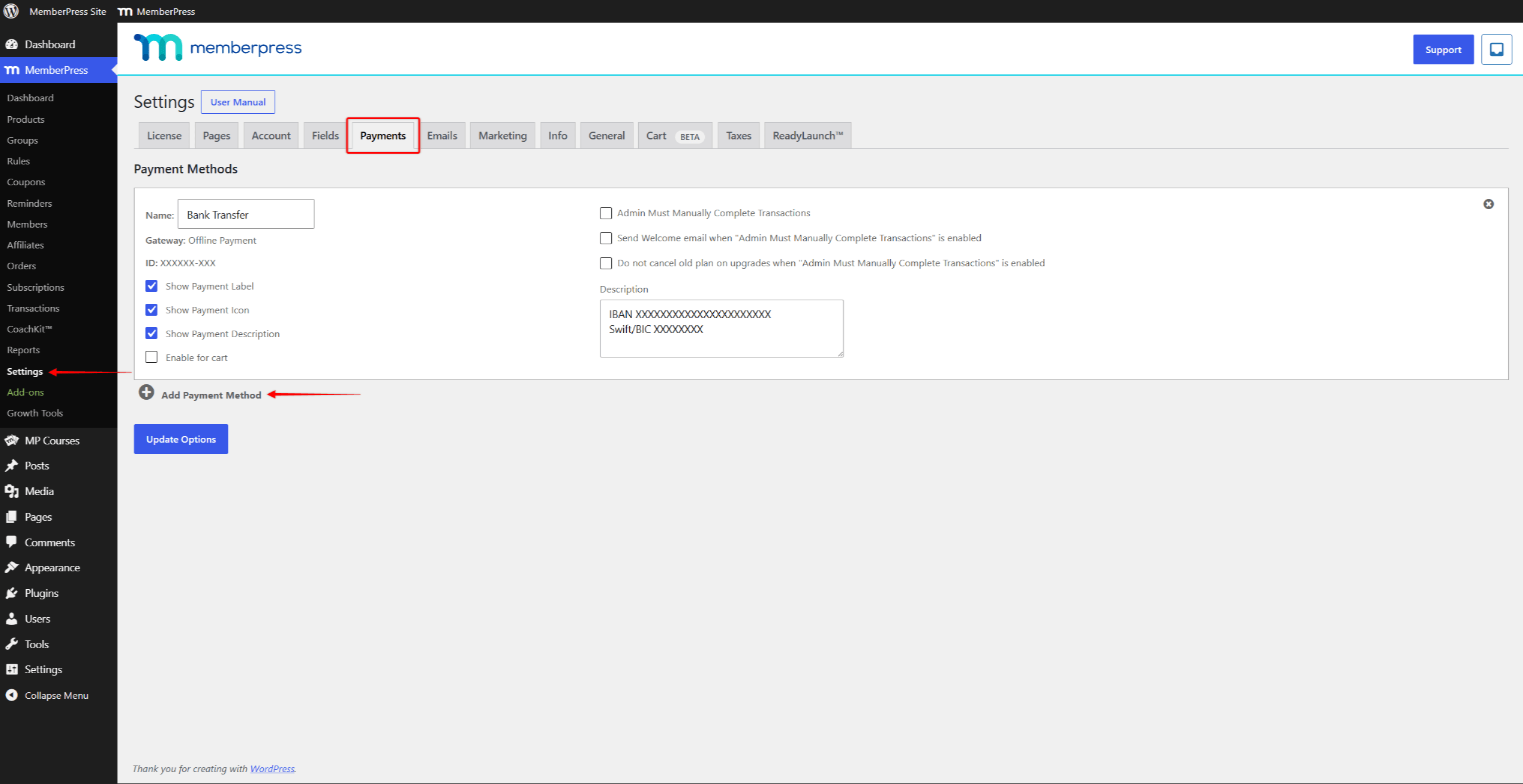
- Nome o método de pagamento. Essa etiqueta aparece nas páginas de registro.
- Choose whether to display the Etiqueta de pagamento, Íconeou Descrição para esse método de pagamento nas páginas de registro.
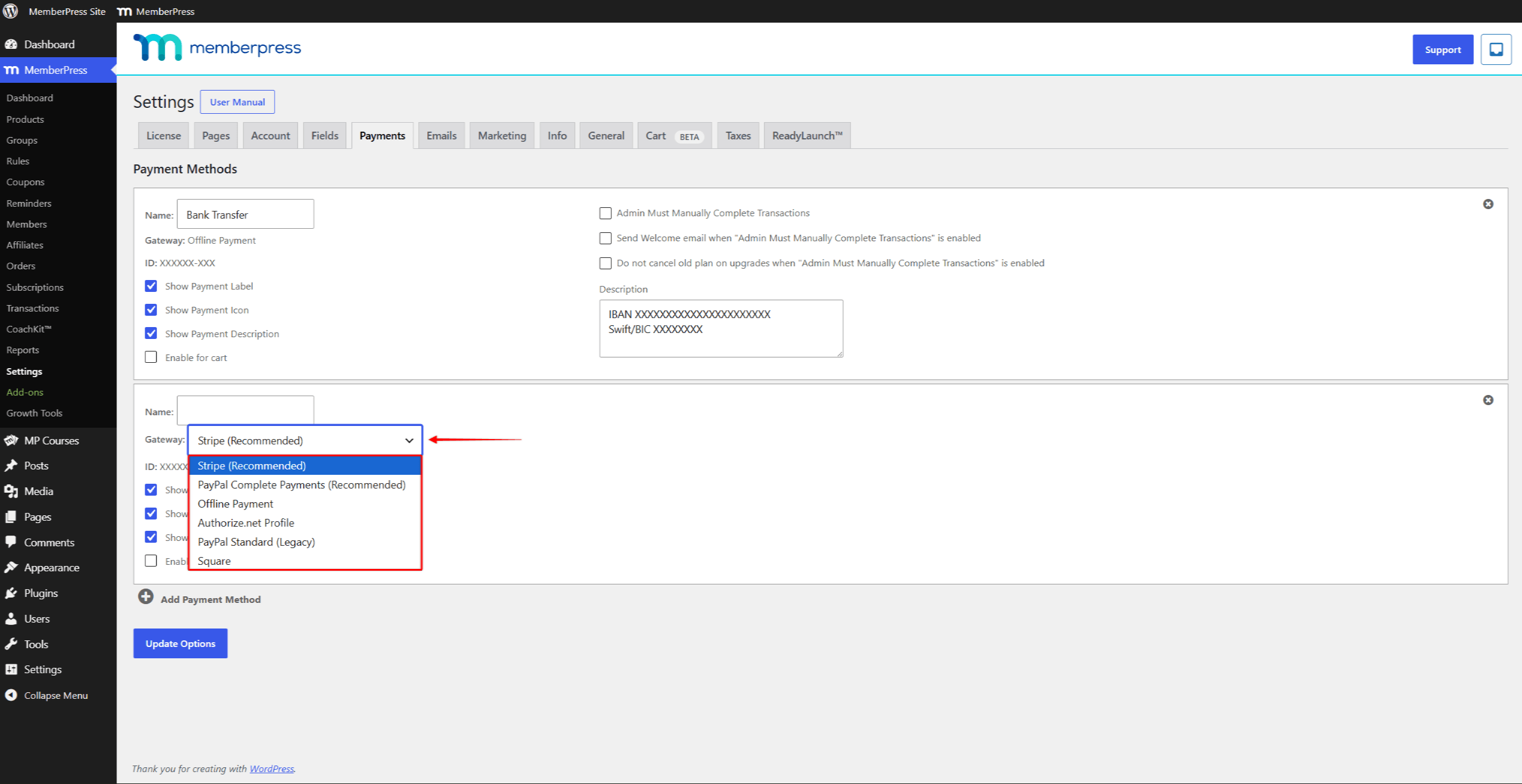
- Selecione um Gateway para esse método de pagamento. Para pagamentos off-line, selecione Pagamento off-line e configurar o gateway de pagamento off-line.
- For online payments, connect the payment method to a processor. Choose between Listrado, PayPal Pagamentos completos, Quadradoe Authorize.net. The dropdown also offers PayPal Standard (Legacy) for older setups. Each online gateway has its own settings and limitações.
- Clique no botão Opções de atualização para salvar as alterações.
Processamento de pagamentos on-line
Online and offline payments follow different processes. Online payments require communication between MemberPress and the connected payment processor.
The process also differs for one-time and recurring subscriptions.
Assinaturas únicas
For one-time subscriptions, the processor handles the payment in the following steps:
- On registration, MemberPress sends the membership terms and user data to the processor.
- The processor collects the card details securely and processes the payment.
- The processor returns the transaction data to MemberPress.
- MemberPress uses the received data to create the transação em seu site.
- The one-time subscription becomes active. It expires when the transaction on your website expires.
Assinaturas recorrentes
Recurring subscriptions add a few steps:
- On registration, MemberPress sends the transaction data and also creates a subscription on the payment processor.
- The processor collects the payment details, processes the payment, and returns the data to MemberPress.
- MemberPress creates the transaction and the assinatura em seu site.
- MemberPress links the transaction to the subscription.
- The recurring subscription becomes active. When the current transaction expires, the subscription renews.
On renewal dates, the processor charges the user automatically based on the subscription created at registration. When MemberPress receives the renewal data, it adds a new transaction to the existing subscription. The new transaction extends the subscription by one period.
The processor keeps renewing the subscription until a member or an administrator cancels it in MemberPress. Canceling in MemberPress tells the processor to stop renewals.
Processamento de pagamentos off-line
Offline payments are simpler to process because no external service is involved. On the other hand, you manage them manually.
The process depends on your offline gateway settings. The O administrador deve concluir as transações manualmente option is on the Pagamentos guia em Painel de controle > MemberPress > Configurações. By default, this option is disabled.
With the option disabled, new transactions get the Completo status. The subscriptions become active at once.
This means members gain access to protected content before you confirm the payment.
Conclusão manual de pagamentos off-line
The recommended setup enables the O administrador deve concluir as transações manualmente option. New transactions then get the Pendente status, and their subscriptions stay inactive.
You update the transaction status manually after confirming the payment. When a user chooses the offline payment method, the process includes the following steps:
- MemberPress creates a transaction with the Pendente status on your website.
- For recurring subscriptions, MemberPress also creates the related subscription.
- You collect the offline payment from the user (for example, by bank transfer). This includes sending a (proforma) invoice if your country requires it.
- Once the payment arrives, navigate to Painel de controle > MemberPress > Transações and find the user’s transaction.
- Clique no botão Pendente status under the Status column to open the dropdown.
- Change the status to Completoe clique em Salvar.
As a result, the subscription becomes active, and the user gains access to the protected content.
For recurring subscriptions, MemberPress does not create new transactions on renewals. For each renewal, collect the offline payment first. Then add the new transaction manually to the existing subscription.











 PT
PT  EN
EN  ES
ES  FR
FR  DE
DE 