Please click on the case example that you would like to learn more about:
- Year Access with an End Date
- Membership with Setup or Other Fee
- X Number of Payments to Expired or Lifetime Access
- Recurring Membership with a Trial Period and Max Amount of Payments
- Recurring Membership with a One-time use Trial Period
- Free Trial Period that Doesn’t Require Payment Details
- Trial Period with a One-Time Billing Type Subscription
Year Access with an End Date
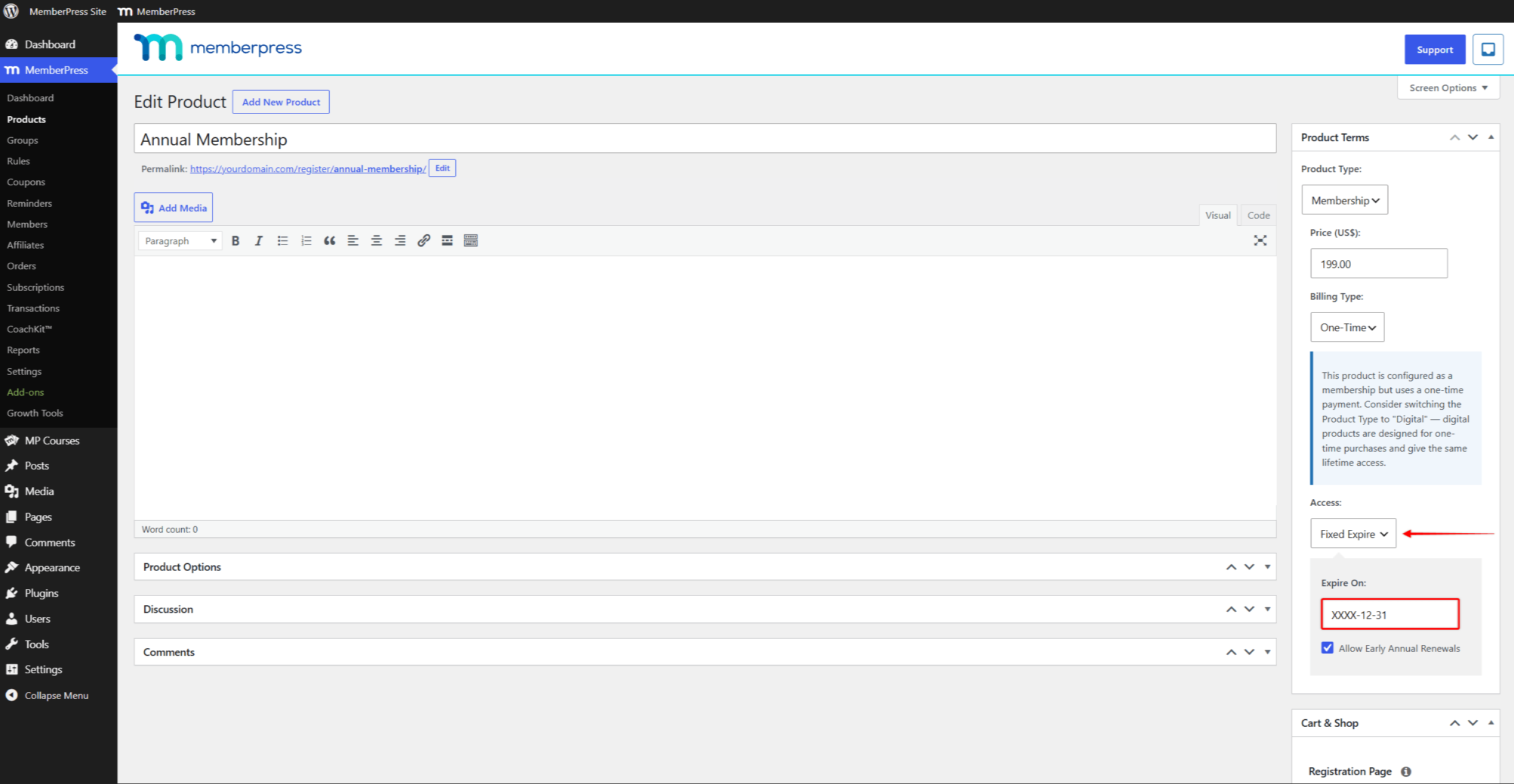
Say you want your members subscriptions to expire at the end of the year (or any other date) after a year (or any set time frame), well for that, you would simply use the ‘Fixed Expire’ setting under ‘Access’ for your one-time type membership ( note: recurring memberships cannot have a fixed expiration date) like this:
Membership with Setup or Other Fee
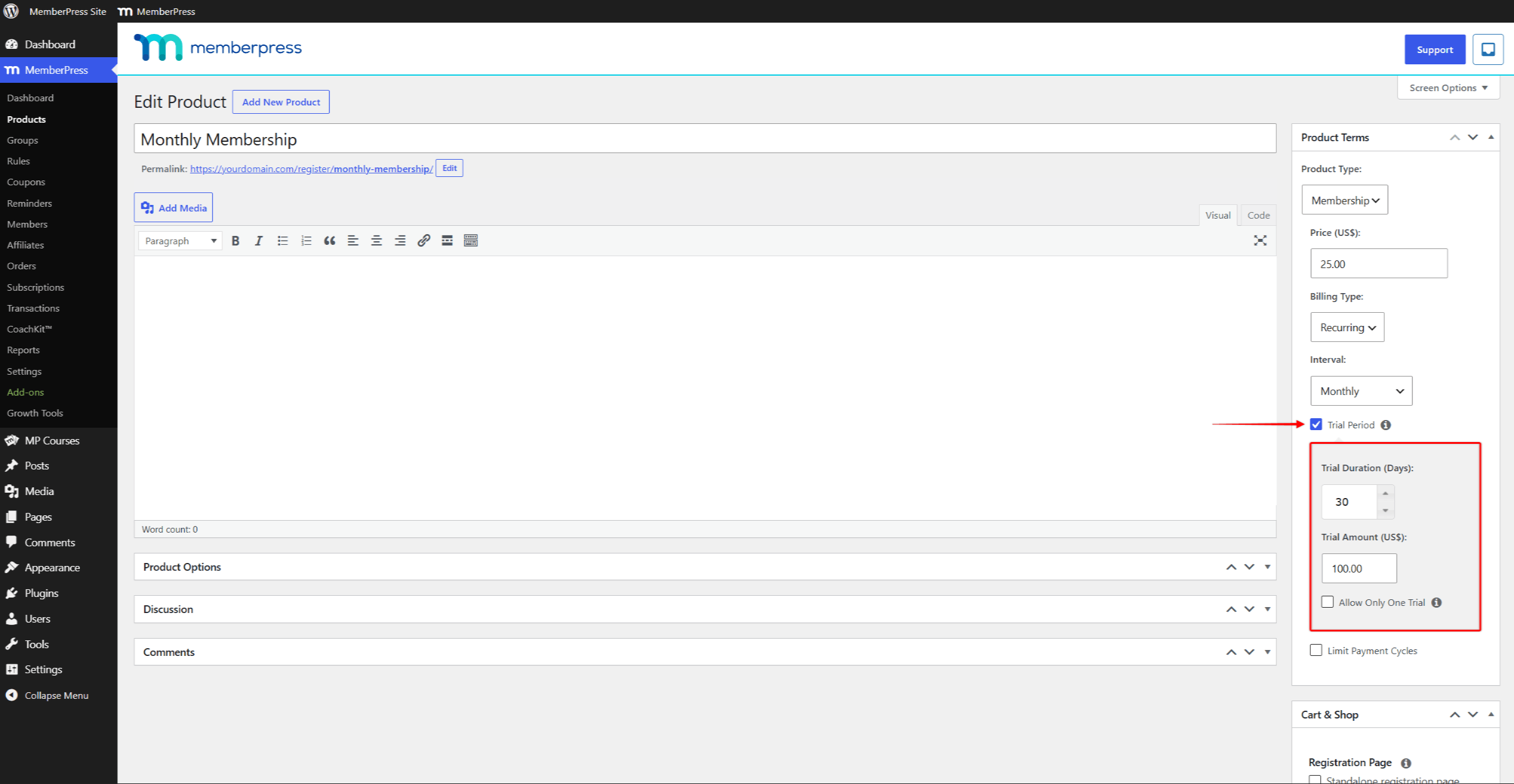
You can use the trial period setting to add an upfront fee, such as a setup fee, to your membership. For example, say the user should pay $100 upfront and then $25 every month. In this case, you would need to set the membership’s Product Terms like this:
X Number of Payments to Expired or Lifetime Access
A membership can require a set number of recurring payments. After the final payment, access can become lifetime or expire. Use the ‘Limit Payment Cycles’ feature and set the Product Terms like this:
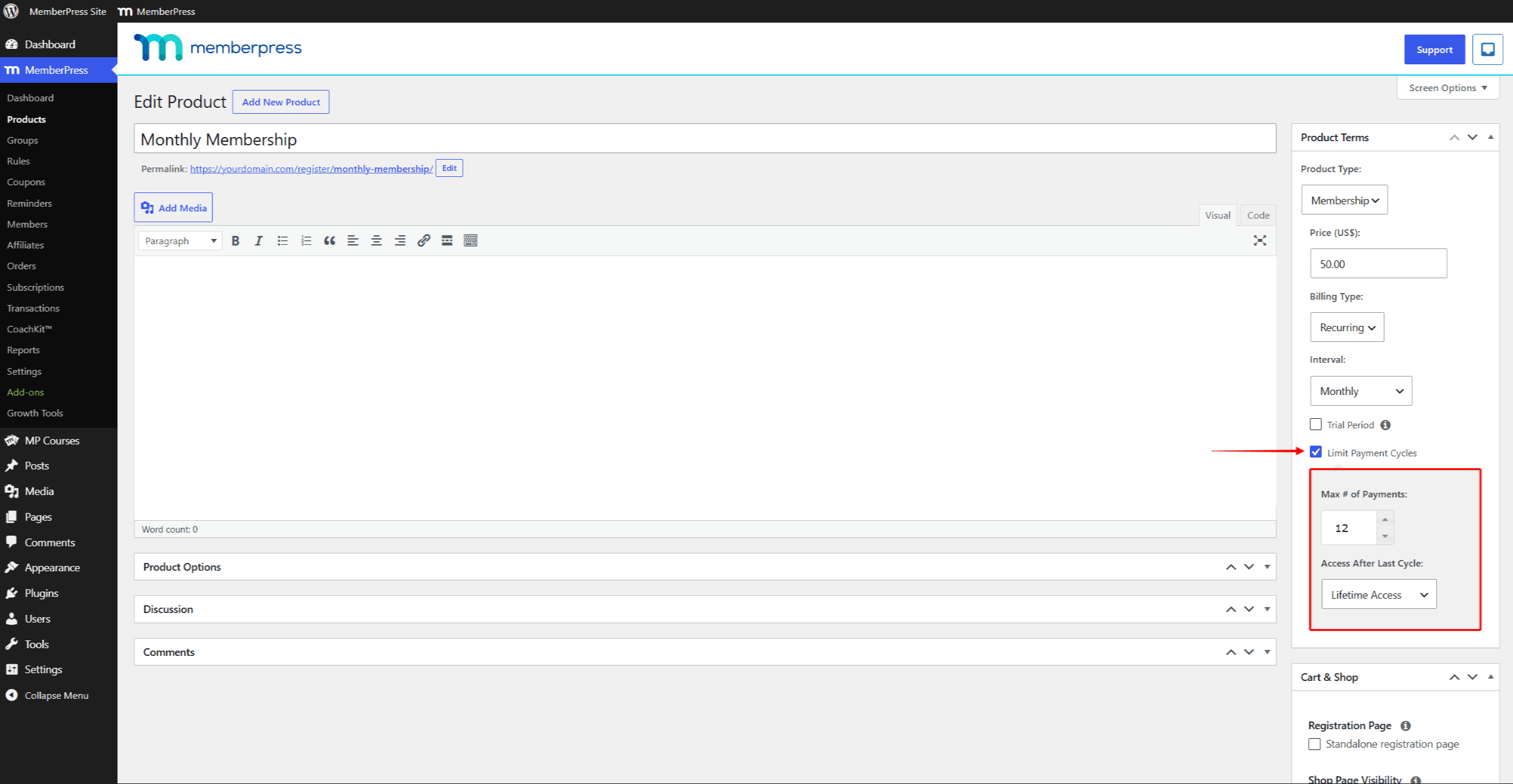
In the above example, users pay monthly for a year and a half. After that, they get lifetime access to the membership’s protected content. Combine different ‘Interval’ rates, ‘Max # of Payments’ values, and access options to build almost any payment plan.
Recurring Membership with a Trial Period and Max Amount of Payments
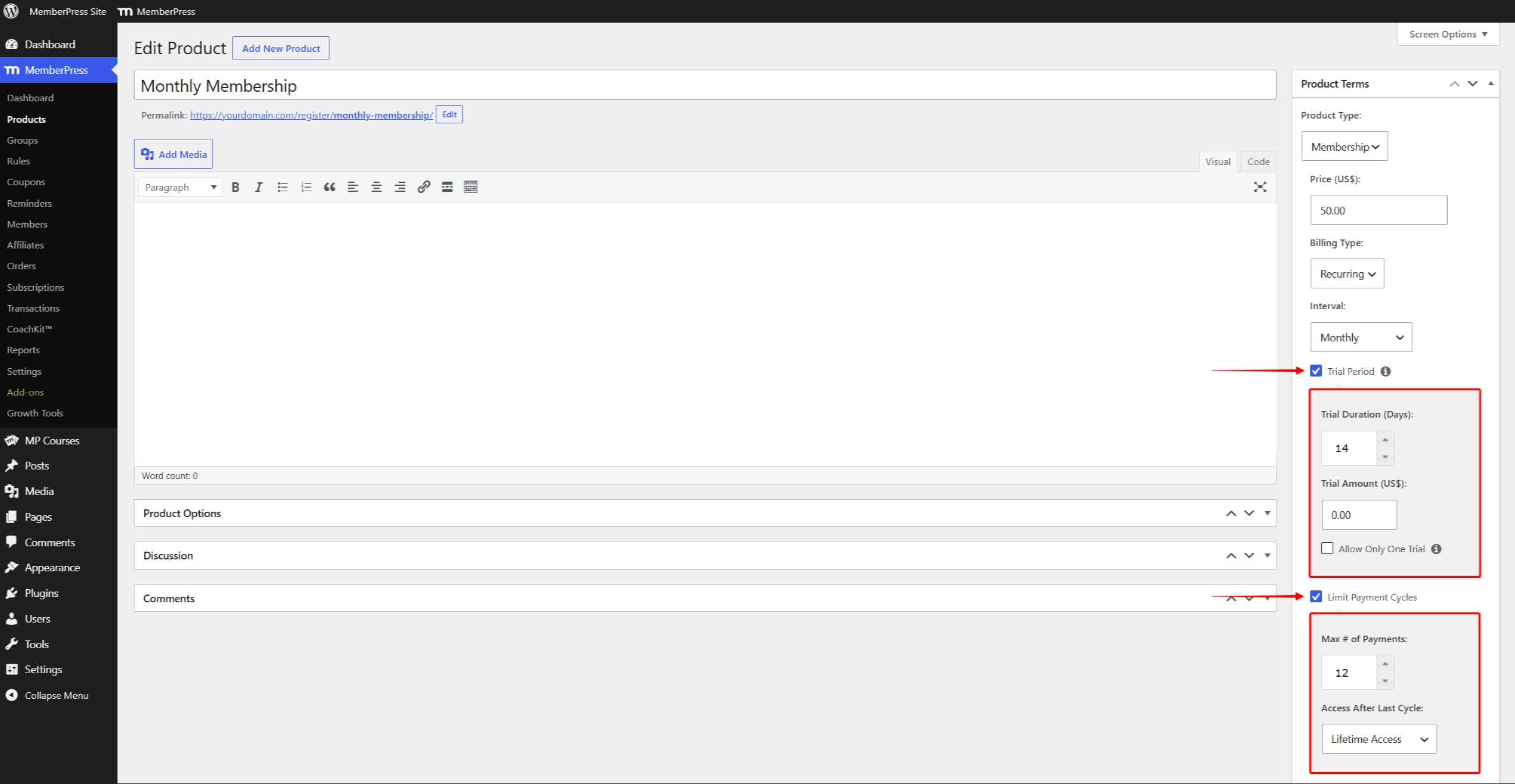
If you create a membership that has both a trial period and a maximum amount of payments, the trial period does not count as one of the payments you have set. In the example below, the member will end up with a total of 13 payments since there is the trial period and also the 12 monthly payments
Recurring Membership with a One-time use Trial Period
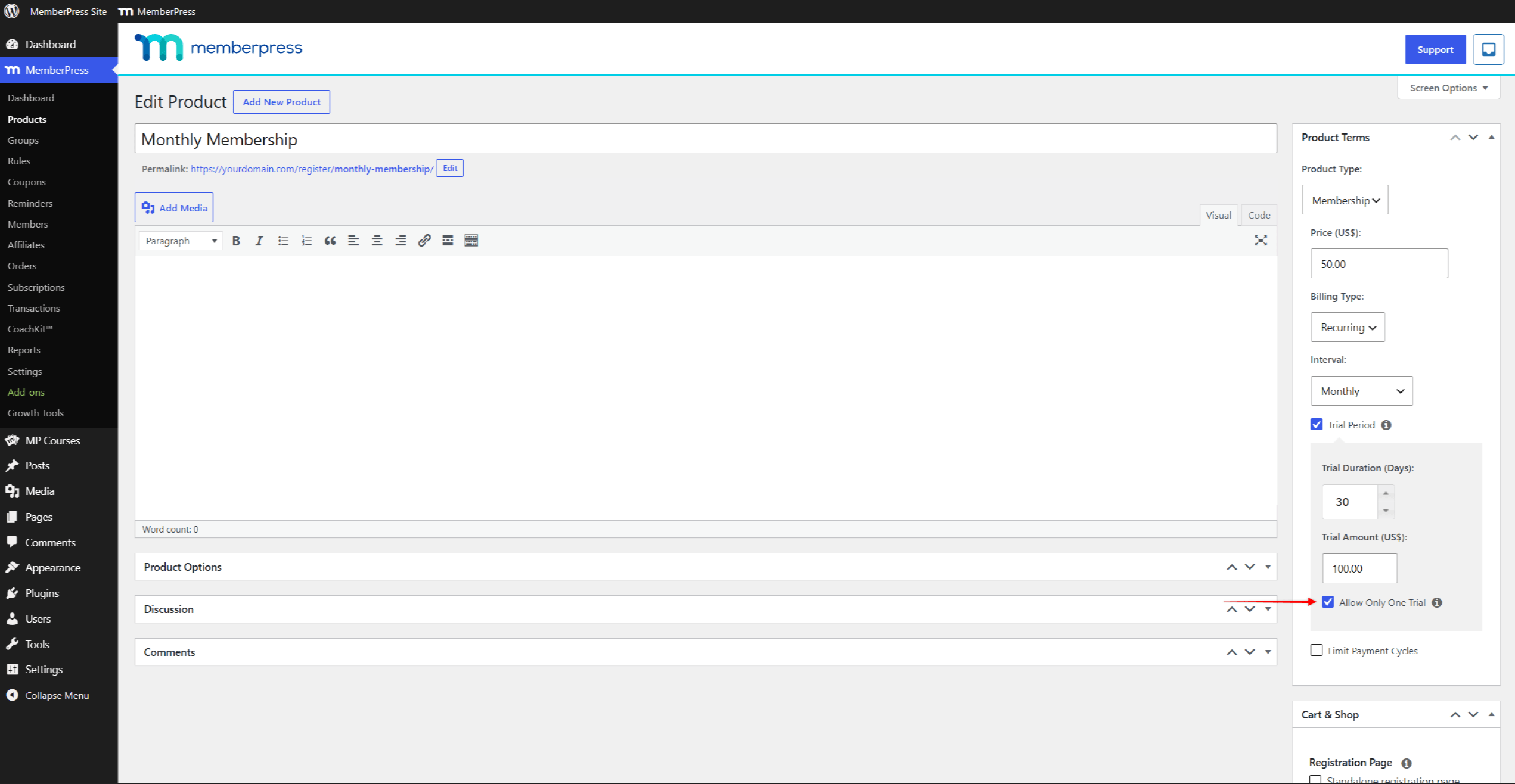
By default, any trial period that you set can be used more than once by the same user if they sign up multiple times to the same membership. If you want to make sure users can only get access to your trial periods once, just use the ‘Allow Only One Trial’ (this even works if your coupon has an ‘Override Trial Period’ set) like this:
Free Trial Period that Doesn’t Require Payment Details
This can’t be accomplished with just one membership. MemberPress asks for payment details (such as a credit card number) when the user registers, even when the trial period is free. This keeps subscriptions running uninterrupted after a free trial period whenever a future payment follows.
The workaround is to use two separate memberships: a free membership that acts as the trial, and your main paid membership. The full procedure is explained in the document on offering trials with one-time memberships. There, you will create both memberships and set the permissions preventing repeated trial signups.
Encouraging Users to Upgrade to Paid Membership
With this free trial period case example, you may want to encourage your users to sign up for one of your paid memberships. This can be done with reminders. You can follow these steps:
- Navigate to Dashboard > MemberPress > Reminders.
- Click the Add New button.
- Using the drop down options, create your reminder trigger. If your free trial period is a lifetime type trial period, then you should use the After Member Signs Up reminder type. Otherwise, use the Before or After Subscription Expires reminder types.
- Click the Edit button that is to the right of the Send [reminder-type-here] Reminder Email to User option.
- In the editor, edit the reminder to include your offer or encouragement that the user upgrade. Include a link to your registration page or group pricing page. You may even consider adding a coupon code in the email.
- Check the “Send only for specific Memberships” option, and select the name of your free trial period membership. Be sure to NOT check any other memberships.
- Click the Publish button to save the reminder.
If this reminder is not sending properly, check the document on troubleshooting reminders not sending.
Trial Period with a One-Time Billing Type Subscription
One-Time Billing Type subscriptions don’t support trial periods. Use the same two-membership workaround described in the offering trials with one-time memberships document.
Follow all of the same steps there. However, when creating your main membership, set the pricing terms as a one-time payment type.